Filter Alchemy
A downloadable tool for Windows, macOS, Linux, and Android
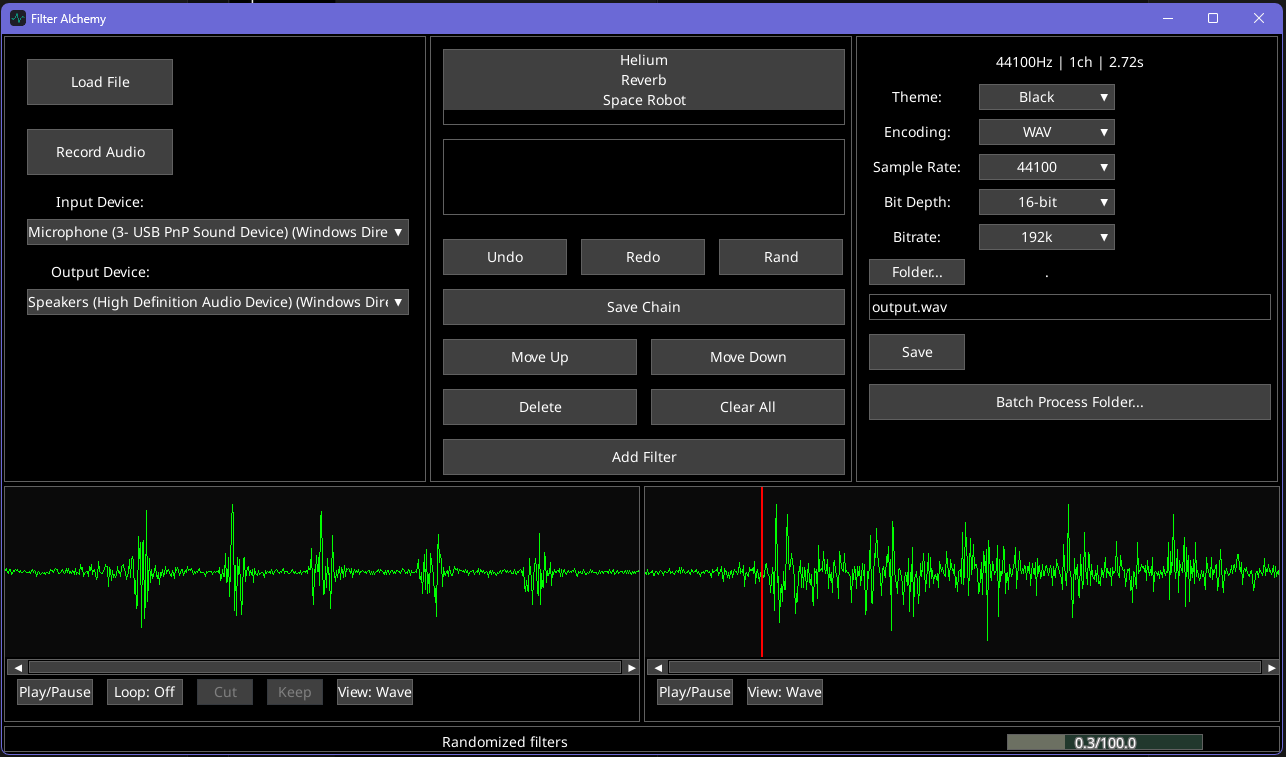
Filter Alchemy is a tool for applying filters and effects to audio. Whether you record or load an existing file, you can easily apply a large variety of effects, and even build your own effects chain. With customizable output, you can fit your new audio sample to any need. It even supports batch processing for when you want an effect chain to be applied to many files (such as processing a huge set of vocal clips for a game with the Space Robot effect)
### Installation
Filter Alchemy is a standalone application. Simply unzip the release folder and double-click the `FilterAlchemy` executable to launch the program. No installation is required!
### Quick Start Guide
1. **Load Audio**: Click the **Load File** button to open a WAV, MP3, OGG, or FLAC file. You can also simply **Drag & Drop** a file directly into the application window.
2. **Record**: Select your microphone from the "Input Device" dropdown and click **Record Audio** (or press `R`). Click again to stop recording.
3. **Add Filters**: Click **Add Filter** in the middle panel. Double-click a filter name (e.g., "Robot", "Reverb", "Pitch Shift") to add it to your processing chain.
4. **Play**: Press **Spacebar** to play. Click on the waveforms to jump to a specific time.
5. **Export**: Type a filename (e.g., `my_sound.wav`) and click **Save** in the top-right panel.
---
## Key Features
### Flexible Filter Chain
* **Stackable Effects**: Add as many filters as you want. The audio flows from top to bottom through the list.
* **Adjustable Parameters**: Select a filter in the list to tweak its settings (e.g., Distortion Drive, Pitch Shift Semitones) in real-time using the sliders below.
* **Reorder**: Use **Move Up** and **Move Down** to change the signal path. (e.g., Distortion before Reverb sounds very different than Reverb before Distortion!)
* **Undo/Redo**: Made a mistake? Press `Ctrl+Z` to Undo and `Ctrl+Y` (or `Ctrl+Shift+Z`) to Redo.
* **Randomize**: Feeling lucky? Click **Rand** to generate a completely random chain of effects.
* **Save Chain**: Save your favorite combination of filters to use later.
### Playback & Visualization
* **Dual Views**: Toggle between **Waveform** (Time vs Amplitude) and **Spectrogram** (Time vs Frequency) views to analyze your audio in depth.
* **Smart Playback**:
* Click the **Original** waveform (left) to hear the raw audio.
* Click the **Filtered** waveform (right) to hear the processed result.
* **Spacebar** toggles playback for the last focused panel.
* **Looping**: Toggle **Loop** (or press `L`) to repeat the audio (or selection) endlessly.
* **Output Selection**: Choose your preferred speakers or headphones from the "Output Device" dropdown.
### Editing Tools
* **Selection**: Click and drag on the waveform to select a specific region.
* **Cut**: Remove the selected region from the audio.
* **Keep**: Crop the audio to *only* the selected region.
* **Loop Selection**: When a region is selected, playback will automatically loop within that selection.
### Export Options
* **Formats**: WAV, MP3, OGG, FLAC, M4A.
* *Note: MP3 and M4A export requires FFmpeg to be installed on your system.*
* **Quality Control**:
* **Sample Rate**: 22kHz to 96kHz.
* **Bit Depth**: 16-bit, 24-bit, or 32-bit Float.
* **Bitrate**: Adjustable for compressed formats.
---
## Keyboard Shortcuts
| Key | Action |
| :--- | :--- |
| **Space** | Play/Pause (Last focused source) |
| **R** | Toggle Recording |
| **L** | Toggle Loop Mode |
| **Delete** | Remove selected filter |
| **Ctrl + Z** | Undo |
| **Ctrl + Y** | Redo |
| **Ctrl + S** | Save / Export |
| **Ctrl + O** | Open File |
| **Ctrl + Up** | Move selected filter up |
| **Ctrl + Down** | Move selected filter down |
| **Esc** | Close popups |
---
## Troubleshooting
* **"No Audio Device Found"**: Ensure your microphone is plugged in *before* starting the app. If you plug it in while the app is running, you may need to restart the app.
* **Slow Performance**: Some filters (like Pitch Shift or Time Stretch) are computationally intensive. If the UI lags, try using fewer of these filters or working with shorter audio clips.
* **Export Issues**: If MP3 export fails, the application will automatically fall back to WAV format. Ensure you have the necessary codecs (FFmpeg) installed on your system if you need MP3/M4A support.
---
## License & Copyright
Filter Alchemy is a commercially licensed product developed by **Aphotic Acoustics via Aphotic Apps**.
**© 2025 Aphotic Acoustics via Aphotic Apps. All rights reserved.**
Unauthorized copying, modification, distribution, or use of this software is strictly prohibited without prior written permission.
---
*For support or licensing inquiries, please contact Aphotic Acoustics at contact@aphoticacoustics.com*
Purchase
In order to download this tool you must purchase it at or above the minimum price of $2 USD. You will get access to the following files:
Leave a comment
Log in with itch.io to leave a comment.