Quick Picker
A downloadable game for Windows, macOS, Linux, and Android
# QuickPicker 🎯
**© 2025 Aphotic Apps. All rights reserved.**
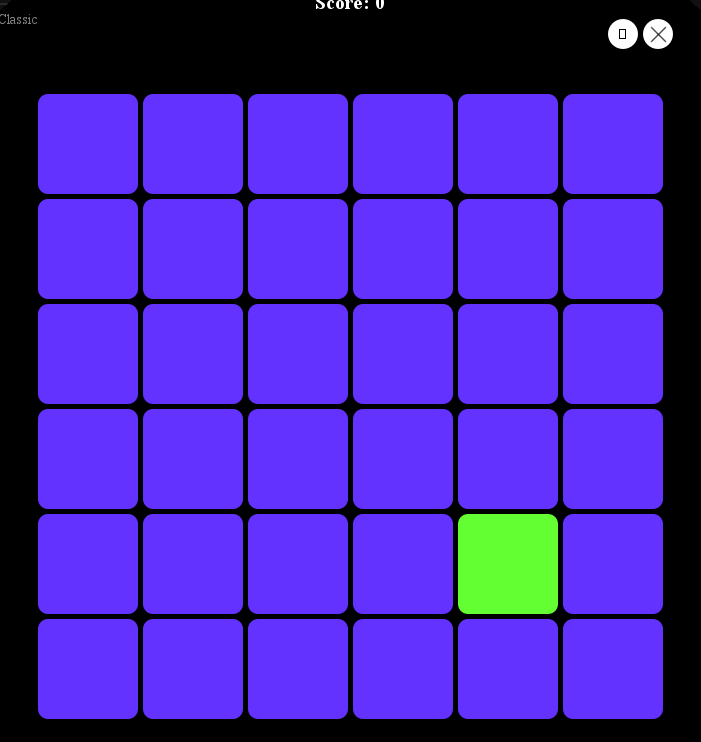
A fast-paced reaction game that tests your reflexes! Click the differently-colored tile before time runs out!
## 🎮 Game Features
### Game Modes
- **Endless Mode** - Practice without penalties. Perfect for warming up!
- **Classic Mode** - Standard gameplay. Miss a tile and lose a point.
- **Timed Mode** - Race against 60 seconds to get the highest score possible.
- **Challenge Mode** - Three lives only! Miss three tiles and it's game over.
### Core Mechanics
- Click the tile that's a different color from the others
- Special modifier tiles appear randomly for bonus points (+5 to +15)
- Build combos for streak bonuses (up to +10 per hit!)
- Game speeds up as your score increases
### Features
- 🏆 Persistent high scores saved between sessions
- 🔥 Combo system with visual effects
- 🎨 Multiple color themes
- 🎵 Background music and sound effects
- 📊 Statistics tracking
- 📚 Built-in tutorial
- ⚙️ Adjustable difficulty and volume settings
## 🚀 Getting Started
### Installation
**No Java installation required!** QuickPicker comes with everything you need.
**Windows:**
1. Download `QuickPicker-windows.zip`
2. Extract the archive
3. Double-click `QuickPicker.exe` to play!
**macOS:**
1. Download `QuickPicker-macos.tar.gz`
2. Extract: `tar -xzf QuickPicker-macos.tar.gz`
3. Double-click `QuickPicker.app` to play!
4. If blocked by Gatekeeper, right-click → Open → Open
**Linux:**
1. Download `QuickPicker-linux.tar.gz`
2. Extract: `tar -xzf QuickPicker-linux.tar.gz`
3. Run `./QuickPicker/bin/QuickPicker` to play!
### System Requirements
- **Windows:** Windows 10 or later (64-bit)
- **macOS:** macOS 10.14 (Mojave) or later
- **Linux:** Modern 64-bit Linux distribution
## 🎮 Controls
| Key/Action | Function |
|------------|----------|
| **Mouse Click** | Select tiles, navigate menus |
| **Space** | Pause/Resume game |
| **Escape** | Back to menu / Quit |
| **Drag Window** | Click and drag to move the game window |
## ⚙️ Configuration
### Difficulty Settings
Adjust game speed in the Settings menu:
- **Easy** - Slower tile changes, more time to react
- **Medium** - Balanced gameplay (default)
- **Hard** - Fast-paced, for experienced players
### Themes
Multiple color palettes available:
- Default (warm colors)
- Cool (blues and greens)
- Neon (vibrant colors)
- Grayscale (monochrome challenge)
### Volume
Background music volume can be adjusted from 0-100% in Settings.
## 📝 Version History
### v1.0.0 (December 2025)
- Initial release
- Four game modes
- Combo system with visual effects
- Persistent high scores
- Built-in tutorial
- Multiple themes and difficulty settings
## 📄 License
QuickPicker is proprietary software owned and licensed by **Aphotic Apps**.
See the LICENSE file for the full End User License Agreement.
## 📞 Support
For support, feedback, or inquiries:
- **Email:** contact@aphoticapps.com
- **Website:** https://aphoticapps.com
---
**© 2025 Aphotic Apps. All rights reserved.**
QuickPicker and the QuickPicker logo are trademarks of Aphotic Apps.
Purchase
In order to download this game you must purchase it at or above the minimum price of $1 USD. You will get access to the following files:
Leave a comment
Log in with itch.io to leave a comment.